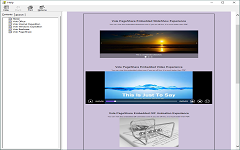
A new generation of slideshow system. The slideshow supports directory navigation, scroll bars, and multiple HTML5 controls. The slideshow supports synchronized video playback, image preview, file preview, and synchronized network resource preview, such as YouTube , Real-time web pages, etc.
Features : As a domestic presentation tool, Vole Briefcase goes beyond the functional scope of traditional slideshow software. It is particularly good at handling complex presentation scenarios and supports deep multimedia integration, dynamic scene loading and interactive content arrangement.
Application scenarios : Suitable for professional presentations such as business reports, academic conferences, product launches, etc., which can significantly enhance the richness and interactivity of presentations.
2. Multimedia Resource Management
Features : Built-in powerful media library management function, supporting efficient classification, archiving, preview and fast retrieval of multimedia files such as pictures, audio, video, etc.
Application scenarios : Suitable for industries such as design, film and television production, and advertising creativity, it facilitates users to manage and call on a large number of multimedia resources and improve work efficiency.
3. Cross- platform team collaboration
Features : Through functions such as "multi-split screen" and "compatibility detection", Vole Briefcase can work with a variety of third-party tools to achieve cross-platform file integration and data synchronization.
Application scenarios : Suitable for scenarios such as document integration for multi-department collaboration and unified management of files across devices, ensuring that team members can collaborate efficiently and share resources.
IV. Education and Training Application
Features : Vole Briefcase has a simple and user-friendly interface, does not require complicated installation, and supports loading preset scene templates at startup, simplifying the content production process.
Application scenarios : Suitable for teachers to create interactive courseware, student homework integration and other educational training scenarios, which can improve teaching efficiency and students' learning experience.
Vole Briefcase
A professional presentation system can easily handle both simple and complex presentations.
专业演示系统轻松应对简单和复杂的演示。
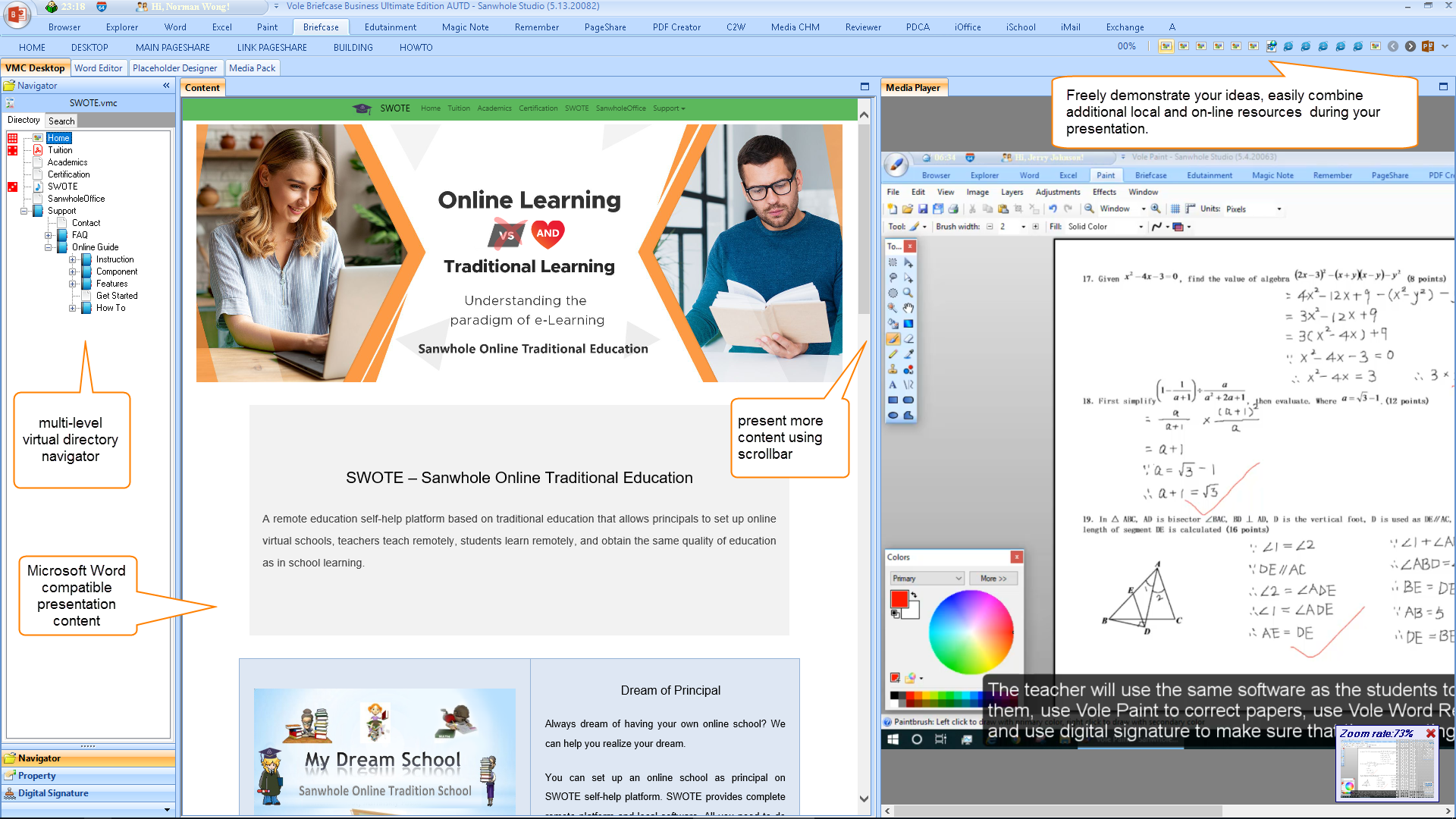
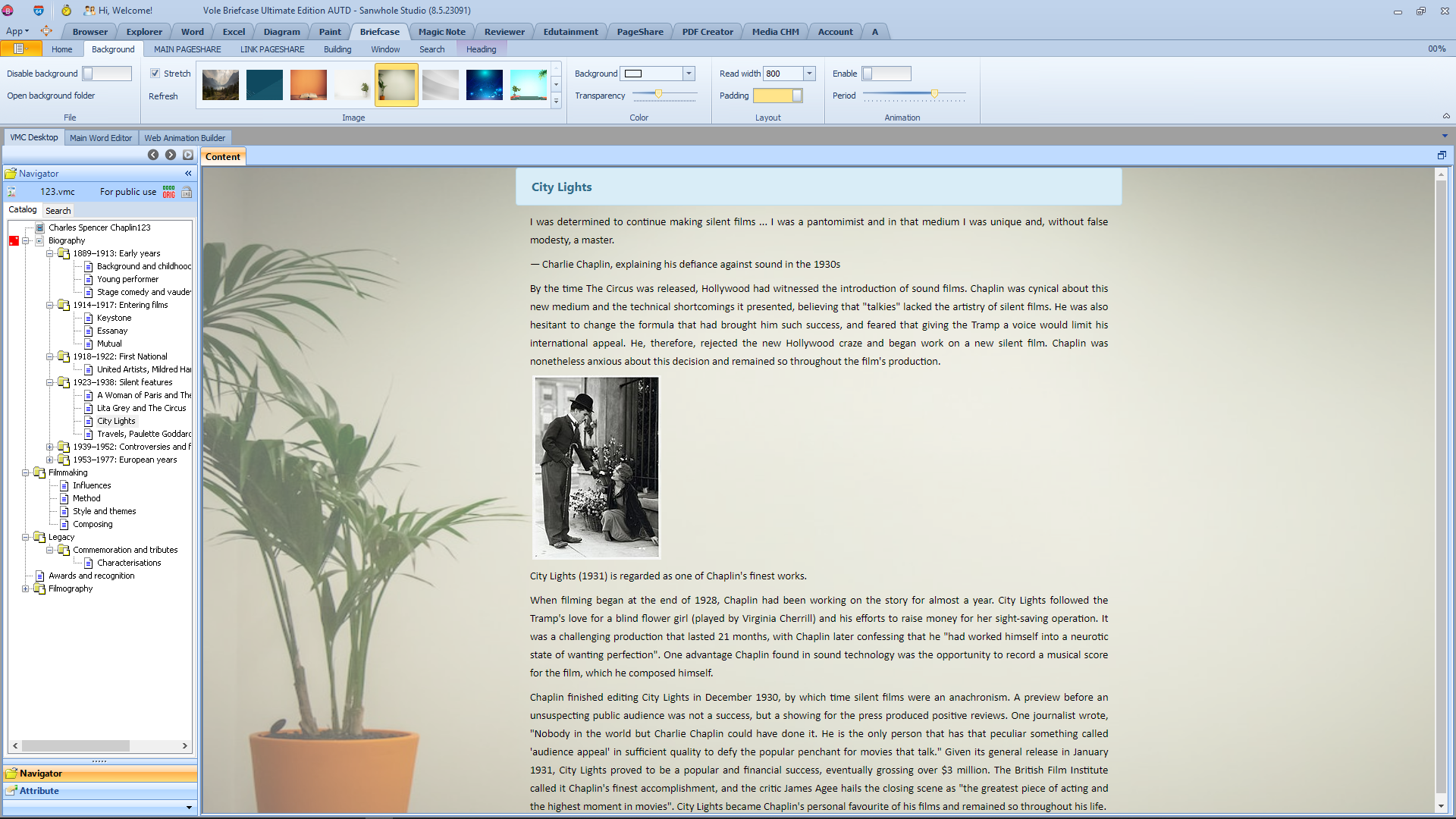
Vole Briefcase presentation system provides two presentation modes: simple mode and professional mode. In simple presentation mode, except for the slide support for scrollbars, the user experience during full screen presentation is basically the same as Microsoft PowerPoint. In professional presentation mode, the slide tree navigator and slide attachment previewer have been added, placed on the left and right sides of the slides respectively. The added navigator and previewer forms can be displayed or hidden. The slide names in the navigator are organized in a tree structure. The previewer is used to synchronously display local file content and network link content added to the slide during presentation.
The Perfect Alternative to Microsoft Word.微软Word的完美佳替代品。
Sanwhole Vole Word
The Perfect Alternative to Microsoft Word.微软Word的完美佳替代品。
Sanwhole Vole Word
The Perfect Alternative to Microsoft Word.微软Word的完美佳替代品。
Sanwhole Vole Briefcase
A More Professional Presentation Software Than Microsoft PowerPoint. 比PowerPoint更专业的演示软件。
Sanwhole Vole Briefcase
A More Professional Presentation Software Than Microsoft PowerPoint. 比PowerPoint更专业的演示软件。
Sanwhole Vole Briefcase
A More Professional Presentation Software Than Microsoft PowerPoint. 比PowerPoint更专业的演示软件。
三合读书心得-轻松记录多种类型的读书笔记
Sanwhole Reading Experience - Easily Record Various Types of Reading Notes.
Creating a Vole Briefcase presentation is very simple and can be done by editing a Word file. In a Word file, each heading corresponds to a slide. The content from this heading to the next heading is the content of this slide. The name of the heading is the name of the slide. The directory structure of Word headings is the directory structure of the slide navigator. When editing Word files, you can use either the built-in Word editor or the Microsoft Word editor installed by the system. In this way, when you finish writing the Word file, your presentation file is also complete. This is different from PowerPoint, which requires creating slides page by page, adding content sentence by sentence, and adding images. The efficiency improvement should not be too much.
Vole Briefcase can add additional local file attachments and network link attachments for each slide. During the presentation, the content of the attachment can be displayed synchronously in the built-in previewer next to the slide. To enrich the content of the slides, enhance the attractiveness of the presentation, and improve the user experience. Local attachments can be any file and support preview of file types including images, audio, video, text with txt extension or not, RTF, WORD, EXCEL, PPT, PDF, GIF, HTML, MHTML, etc. Web link attachments include: web image, audio, video file addresses, such as PNG, MP3, MP4; web video sharing, such as YouTube, Vimeo; website webpage addresses, such as Microsoft, Apple;
Vole Briefcase can add rich HTML5 web controls to the slides, such as the well-known Slideshow. When editing Word, insert a preset table at the location where the Slideshow control needs to be displayed. And replace the images and text descriptions in the table. This slide show is completed. During the presentation, the software will render the table as a Slideshow before displaying it. The supported HTML5 web controls include Hover Zoom, Zoom Modal, Slideshow, Accordion, Light Box, Accordion, List Scroller, Advanced Tabs, Tree, Custom HTML Code, etc. Some of them can enhance the presentation effect, while others, such as Tree, Tabs, Accordion, are very useful for accommodating large amounts of text, images, and table data. It can make your presentation content both beautiful and informative.
Vole Briefcase 可在幻灯片添加丰富的HTML5 Web控件,比如我们熟知的Slideshow。在编辑Word时,在需要显示Slideshow控件的位置插入一个预设表格。并替换表格内的图片和文字介绍。这个Slideshow就完成了。系统在演示时,会将该表格渲染成Slideshow后再显示。支持的HTML5 web controls包括:Hover Zoom, Zoom Modal, Slideshow, Accordion, Light Box, Accordion, List Scroller, Advanced Tabs, Tree, Custom HTML Code等。其中一些可以增强演示效果,而另外一些,如Tree,Tabs, Accordion 在容纳大量的文字,图片和表格数据上非常有用。它可以让你的演示内容既美观又不失内含。
The following two tables compare Sanwhole Vole Briefcase and Microsoft Office PowerPoint in two presentation modes. In simple presentation, Vole Briefcase can almost achieve all the presentation functions of Microsoft PowerPoint (score: 12:16). In complex presentation, Microsoft PowerPoint is almost unable to implement any Sanwhole Vole Briefcase features (score: 2:33). Please refer to the comparation table below for details.
* Copying Shapes, 3DModels, WordArt created in Microsoft Office Word or PowerPoint can effectively paste them into Vole Briefcase.
**
Conclusion: In dealing with simple presentations, Microsoft PowerPoint has a slight advantage over Sanwhole Vole Briefcase.
Comparison Table in Complex Presentation
Function
Purpose
Microsoft
PowerPoint
Sanwhole
Vole Briefcase
Slide name
Slide name is an effective method for accurately finding slides. PowerPoint, on the other hand, can only search for slides through thumbnail images. However, it becomes difficult to find slides when they encounter similar thumbnail images.
○
☺
Directory tree of slide names
Necessary for professional overload presentation. For example, a 50 pages scientific article.
○
☺
Slide page scrollbar
Like PowerPoint, without scrollbars, the text on the page automatically shrinks as the content increases, making it completely inadequate for presenting a large amount of content.
○
☺
Table nesting
Necessary for professional data presentation.
○
☺
Convert Word to Slides
Necessary. Completing Word is equivalent to completing PPT, greatly improving work efficiency.
○*
☺
Insert HTML5 web controls
More web share videos
Supporting only a few video sharing websites is not enough.It should support any website and video that provides video sharing code.
○
☺
Web MP4 and other videos
It is necessary to support web audio and video. Otherwise, massive Internet audio and video resources will be lost.
○
☺
Web MP3 and other audios
○
☺
Zoom
Necessary for professional presentation.
☺
☺
Zoom Modal
○
☺
Slideshow
☺
☺
List Scroller
○
☺
Lightbox
○
☺
Accordion
Necessary for large data neat presentation.
This type of control is very useful for dealing with large amounts of text, images, and table data. It can classify and neatly place these large amounts of data into table pages or tree nodes. This makes the presentation page structure clear, tidy, and beautiful. And it is convenient to find the corresponding page.
○
☺
Tabs
○
☺
Tree
○
☺
Float Menu
○
☺
Real-time Website
Necessary,especially when emphasizing citation sources.
○
☺
HTML Custom Code
Necessary for advanced professional presentation.
○
☺
Add attachments to slide and display them in built-in previewer
Any Images
Necessary for professional presentation.
Add corresponding local file attachments and network resource links based on the content of the slide. Display the attachment content of the slide in the built-in previewer while demonstrating it.
For example, if your slide content is about the solar system, you can add some pictures and video attachments related to the solar system. In this way, when you explain the solar system, you can choose to display these pictures and videos simultaneously in the built-in previewer.
For example, if you are demonstrating a product, you can add a webpage link for that product. So, the previewer will display the real-time webpage of the product.
For example, if you are introducing a movie star, you can add some YouTube video clips of the movies starring that star. In this way, you can play the movie works from different periods in the previewer.
For example, you are introducing the end-user usage agreement for your product. You can add the Word or PDF file of this agreement to this page. This will display the complete content of the file in the previewer.
The built-in previewer in Sanwhole Vole Briefcase is displayed alongside the slides. You can adjust the display scale of the previewer. Or hide, show, maximize.
○
☺
Any Videos
○
☺
Any Audios
○
☺
Any TXT with extension .txt or not.
○
☺
RTF
○
☺
Word, Excel, PPT
○
☺
PDF
○
☺
Gif
○
☺
HTML, MHTML
○
☺
XML Diagram
○
☺
Any Web Images
○
☺
Any Web Videos
○
☺
Any Web Audios
○
☺
Any Web Share Videos such as YouTube, Vimeo, etc.
○
☺
2
smiling face
33
smiling face
* Personally tested, although PowerPoint has the option to open Word, the conversion rate is less than 10%, which can be said to be unusable.
Conclusion: Unlike Sanwhole Vole Briefcase, Microsoft PowerPoint is not suitable for complex presentations in terms of efficiency, professionalism, and functionality. PowerPoint is suitable for use in scenarios where the total number of pages is small, the text on each page is minimal, accompanied by rich images, and additional animations and page transition effects are added. But it is not suitable for professional, complex, and overloaded presentations. In fact, it is rare to see someone using PowerPoint to present a professional article that exceeds 50 pages and contains a large amount of text, images, and data tables.
Freely Demonstrate Your Ideas - Classic Experiences
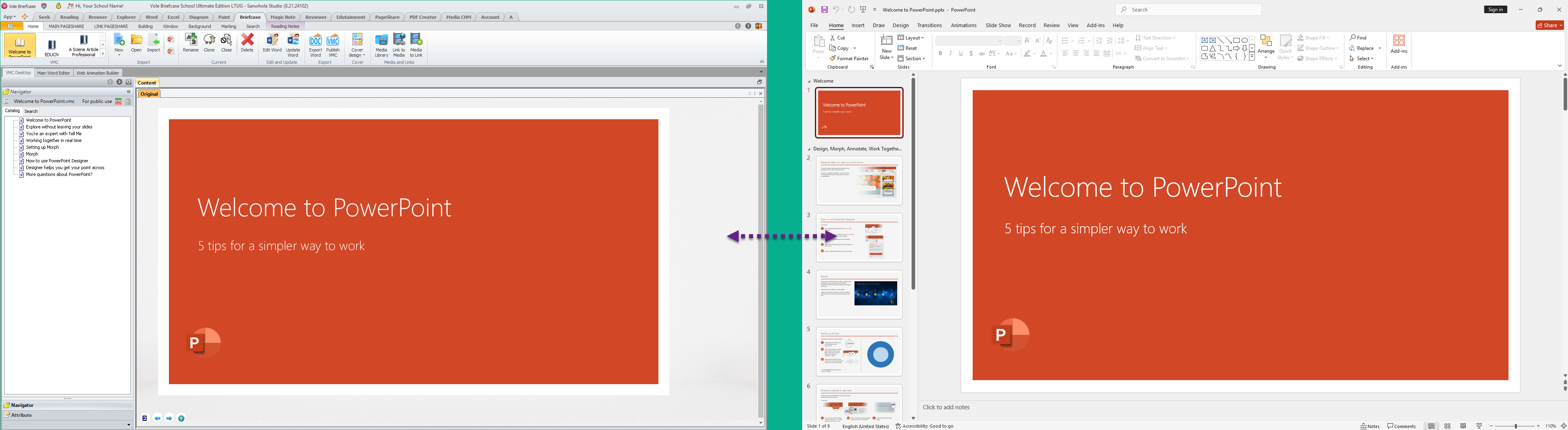
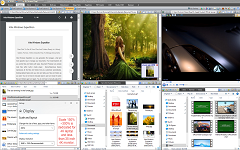
Vole Briefcase and PowerPoint in Simple Presentation – not start
Detail = Left is Vole Briefcase, right is PowerPoint.
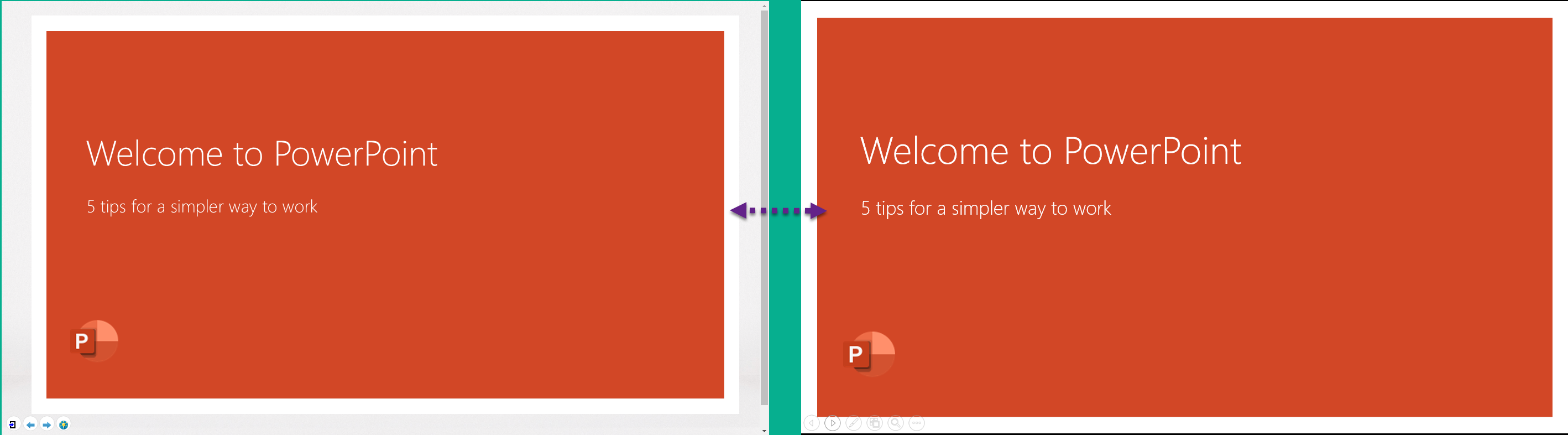
Vole Briefcase and PowerPoint in Simple Presentation - started
Detail = = Left is Vole Briefcase, right is PowerPoint.
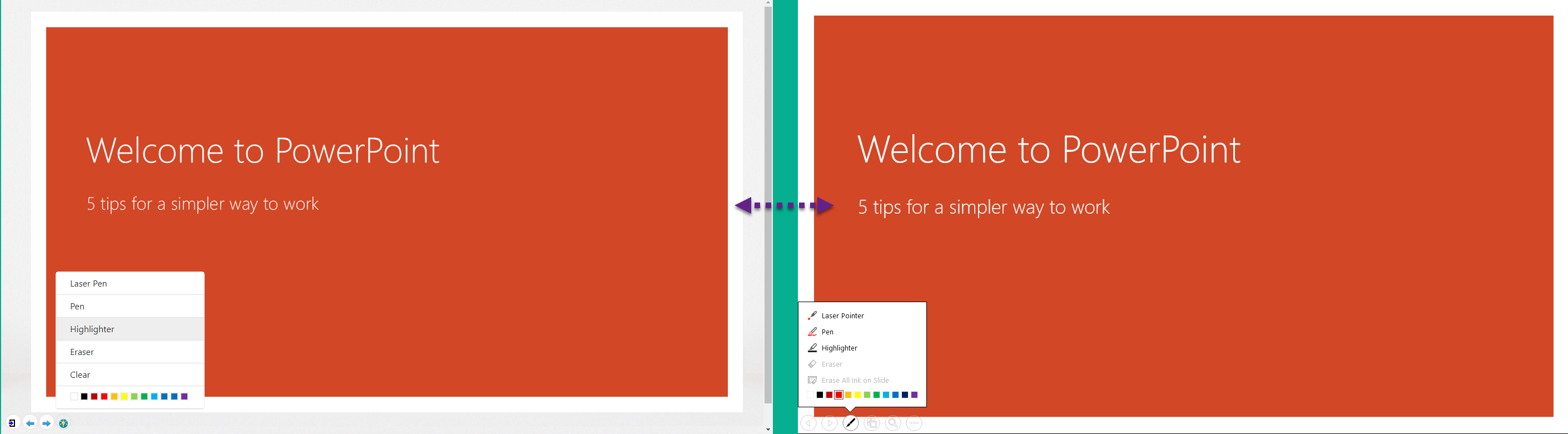
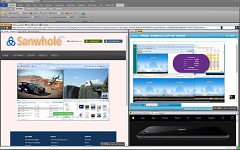
Vole Briefcase and PowerPoint in Simple Presentation – screen tools
Detail = Left is Vole Briefcase, right is PowerPoint.
Video of Vole Briefcase and PowerPoint in Simple Presentation
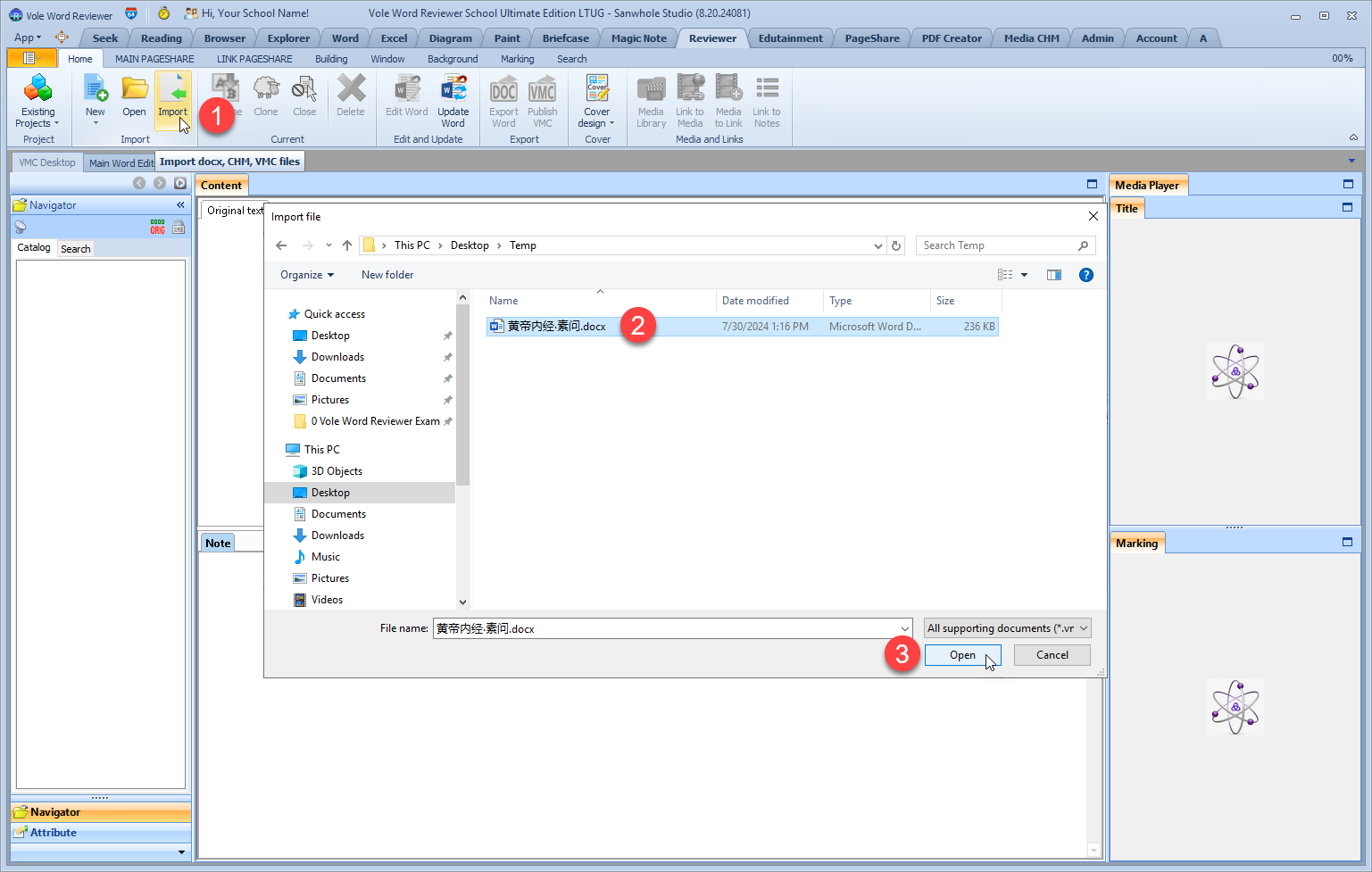
Create Presentation via Import Word. 通过导入Word创建演示。
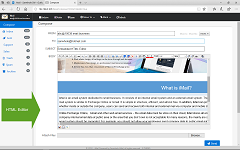
The software can create presentation via create or import Word file and let user edit the Word file inside the built-in Word Editor.
该软件可以通过创建或导入Word文件在创建演示项目。并让用户在内置的Word编辑器编辑Word。
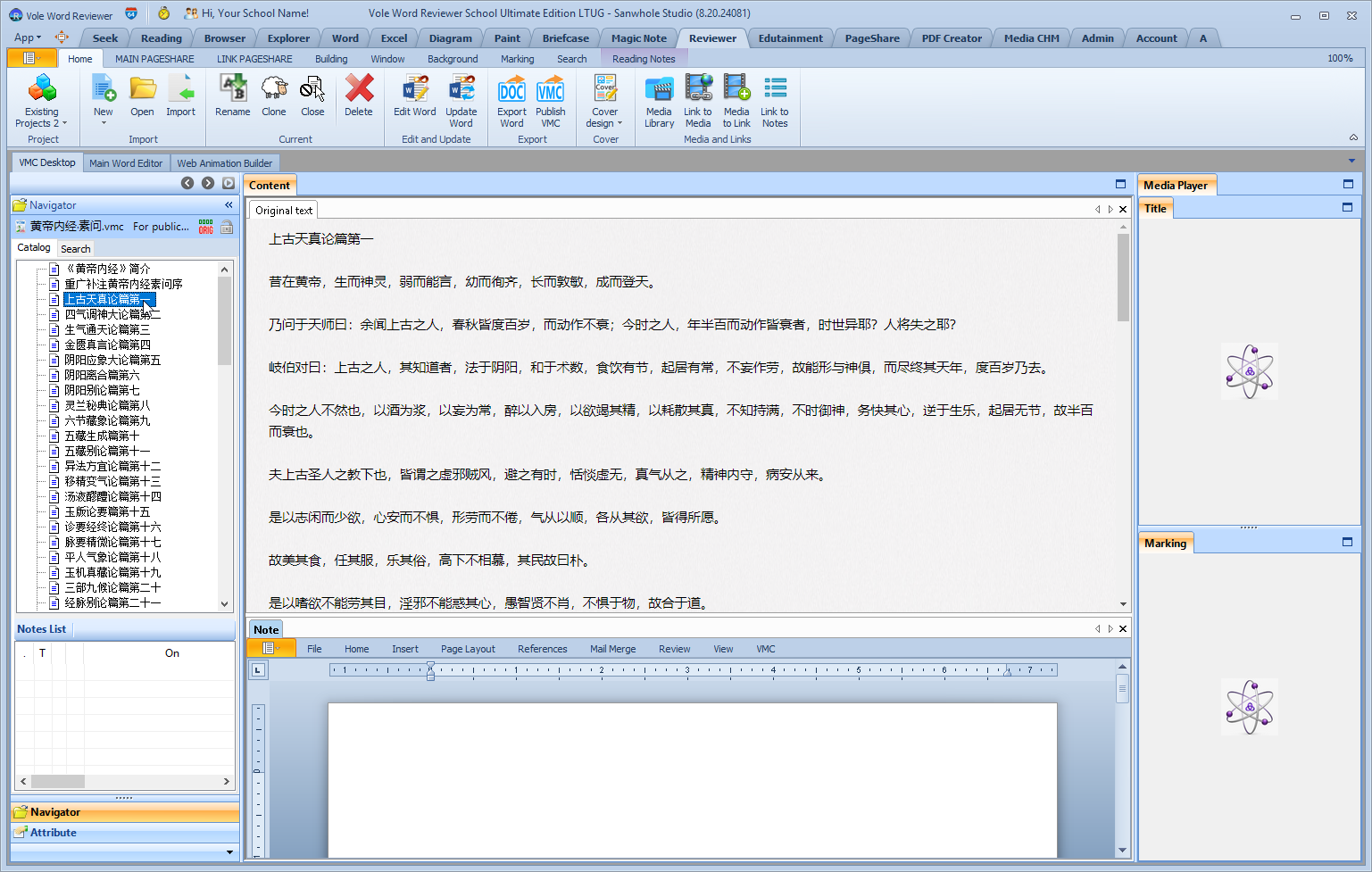
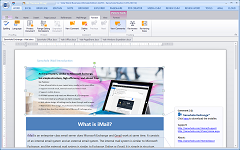
The built-in Word reader in the software provides a user experience similar to Microsoft Word when reading Word. 使用软件内置的Word阅读器阅读Word时具备与微软的Word相似的用户体验
Edit Presentation编辑演示
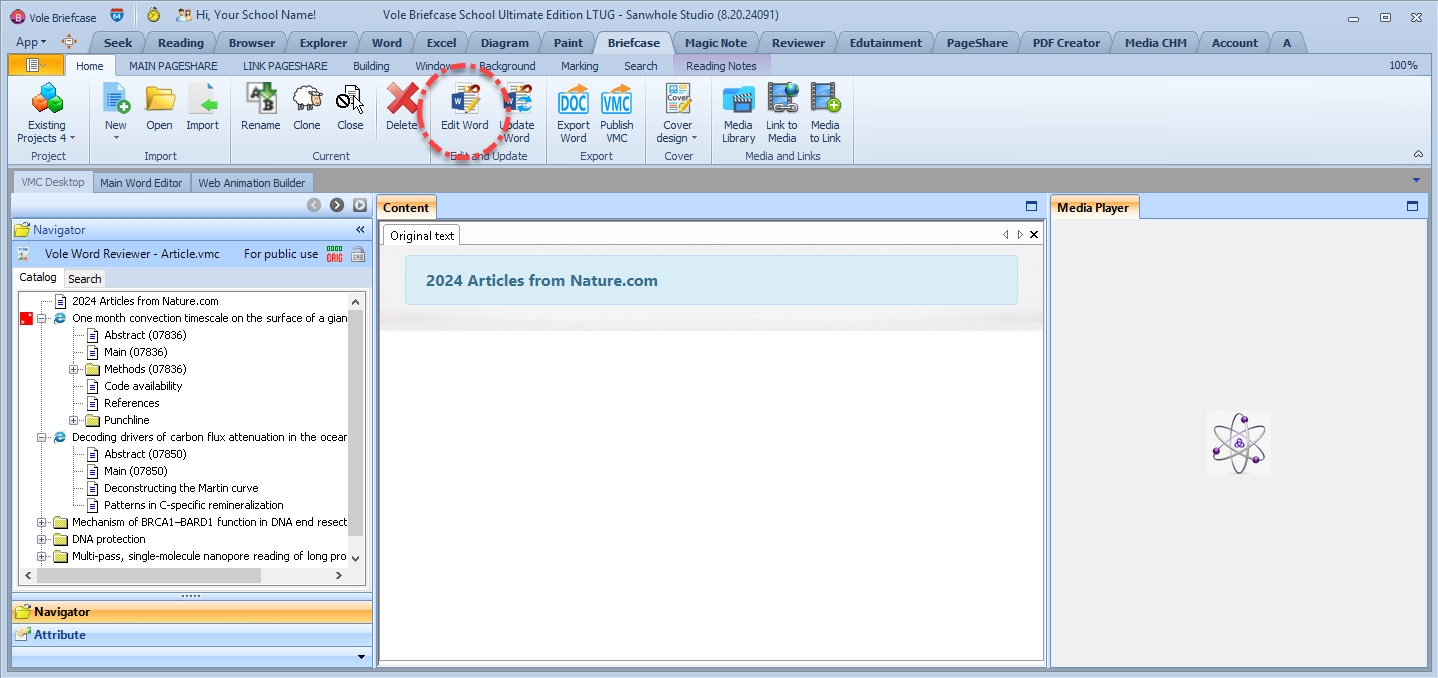
During the creative process, you can open the built-in Word full-featured editor by clicking the Edit Word button to edit your work. 创作过程中,可以通过点击编辑Word 按钮打开内置的Word全功能编辑器来编辑作品。
Building Mode 构建中
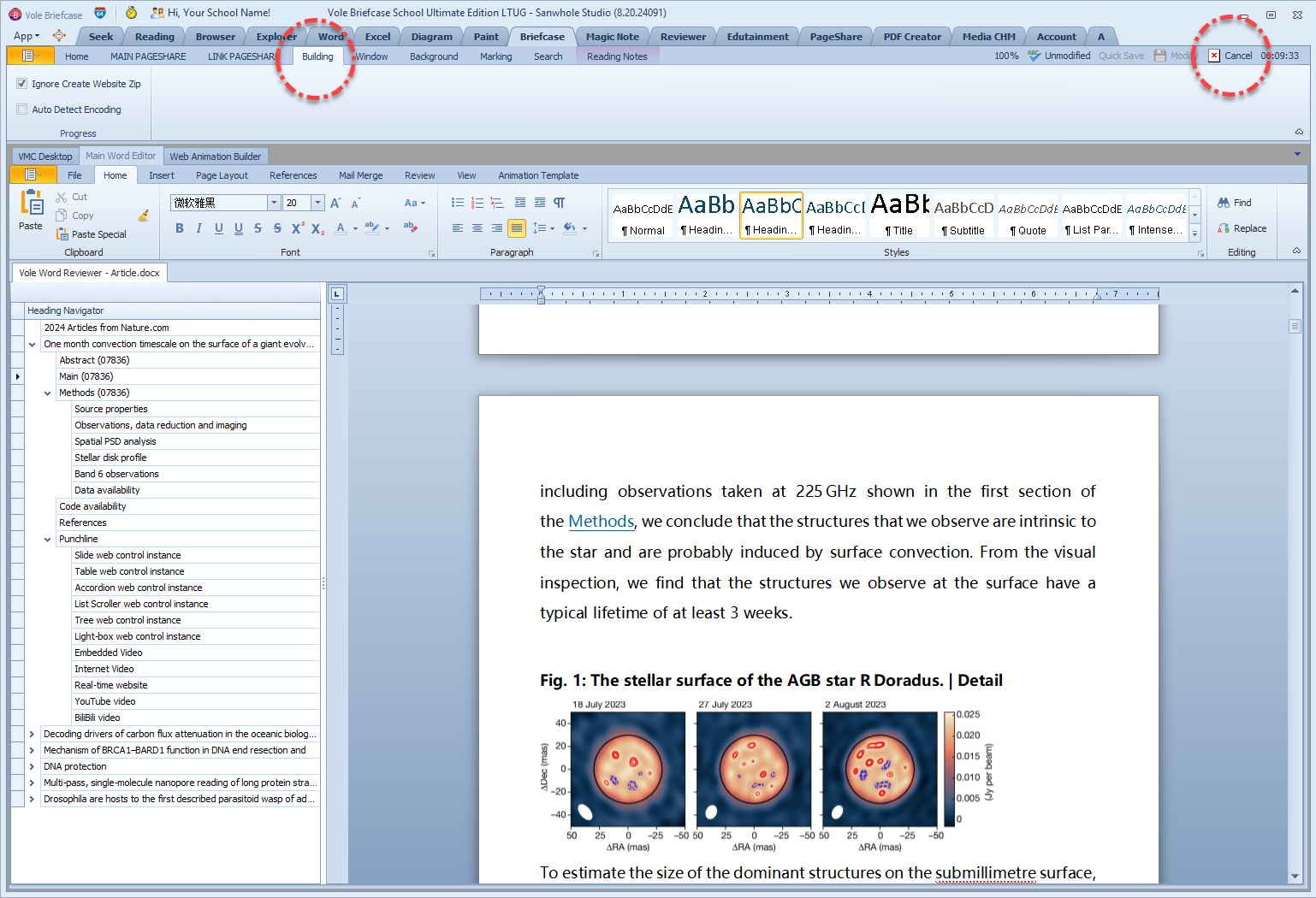
After clicking the Edit Word button, enter Building mode. At this time, except for the Word editor, no other windows are available. If you want to give up this editing, you can click the Cancel button on the right. 点击编辑Word按钮后,进入Building模式。此时,除了Word编辑器可用外,其它窗口都不可用。如果想放弃本次编辑,可以点击右侧的取消按钮。
Full featured Word editor全功能Word编辑器
After editing, please click the Save button. After saving, the Modify button in the upper right corner will become effective again. After clicking the Modify button, the software will exit the Building state and begin processing a series of tasks after editing the Word file. Until the VMC is reloaded and the editing task is completed. 编辑完成后请点击保存按钮。保存后,右上角的修改按钮会恢复有效。点击修改按钮后,软件将退出Building状态,并开始处理编辑Word文件后的一系列工作。直至重新加载VMC后完成本次编辑任务。
When writing, users edit the Word file in the built-in Word Editor, save and exit it. The Word file will be interpreted and rendered by the built-in Word Reader before being displayed to the user. The Word Editor's editing and display are fully compatible with Microsoft Word. But in addition to being compatible with displaying Word content, the Word Reader can also interpret, render, and display Sanwhole Web Animation Controls. The Sanwhole Web Animation Control includes a series of controls with HTML5 animation effects, such as Hover Zoom, Zoom Modal, Slideshow, Accordion, Light Box, Accordion, List Scroller, Advanced Tabs, Tree, Custom HTML Code, etc. Slides are familiar, while Custom HTML Code supports any HTML CODE. Its typical application is to display YouTube videos, BiliBili videos, or real-time website web pages in Word. These shared videos all provide an HTML code for video sharing. Each Sanwhole Web Animation Control is a small piece of Word content. When writing, it can be added to Word as needed. This Word content will not display animation effects in the built-in Word Editor or Microsoft Word. But after being explained by the built-in Word Reader, that small section of Word content will be rendered as the corresponding animation control. The final presentation to the user is Word with various animation effects.
The Animation Template tab is used to insert web animation templates into Word files. In a Word file, each web animation template is a small section of Word content containing template text and template images. Users only need to replace the template text and template images with their own content.
在写作时,用户在编辑器中编辑写作的Word文件,保存退出后。该Word文件将交由阅读器解释和渲染之后再展示给用户。编辑器的编辑和显示与微软Word完全兼容。但阅读器除了可以兼容显示Word内容外,还可以解释、渲染、显示Sanwhole网页动画控件。Sanwhole网页动画控件包含一系列具备HTML5动画效果的控件,比如: Hover Zoom, Zoom Modal, Slideshow, Accordion, Light Box, Accordion, List Scroller, Advanced Tabs, Tree, Custom Html Code etc. 幻灯片很熟悉,而自定义HTML代码(Custom Html Code)支持任何HTML CODE,典型应用是在Word中显示YouTube视频, BiliBili视频,或是显示实时网站网页。这些分享视频都提供一段视频分享的HTML代码。每个Sanwhole网页动画控件都是一小段Word内容。在写作时可以根据需要添加到写作的Word中。这个Word在编辑器中或微软Word中不会显示动画效果。但是经阅读器解释后,那一小段Word内容将被渲染为相应的动画控件。最终呈现给用户的是具备各种动画特效的Word。
In addition to using the built-in Word Editor, editing Word also supports external Word editors. Due to our Word Editor being fully compatible with Microsoft Word. Therefore, it is recommended to use Microsoft Word. Avoid post production difficulties caused by incomplete compatibility between some Word editors and Microsoft Word. The specific operation is to use the Export Word button to export the Word file, then use Microsoft Word for editing, and after editing is complete, use the Update Word button to complete the task of editing Word. Please note that you must exit the Microsoft Word editor before clicking the Update Word button.
Attach multimedia files, link online resources and preview in built-in media player.
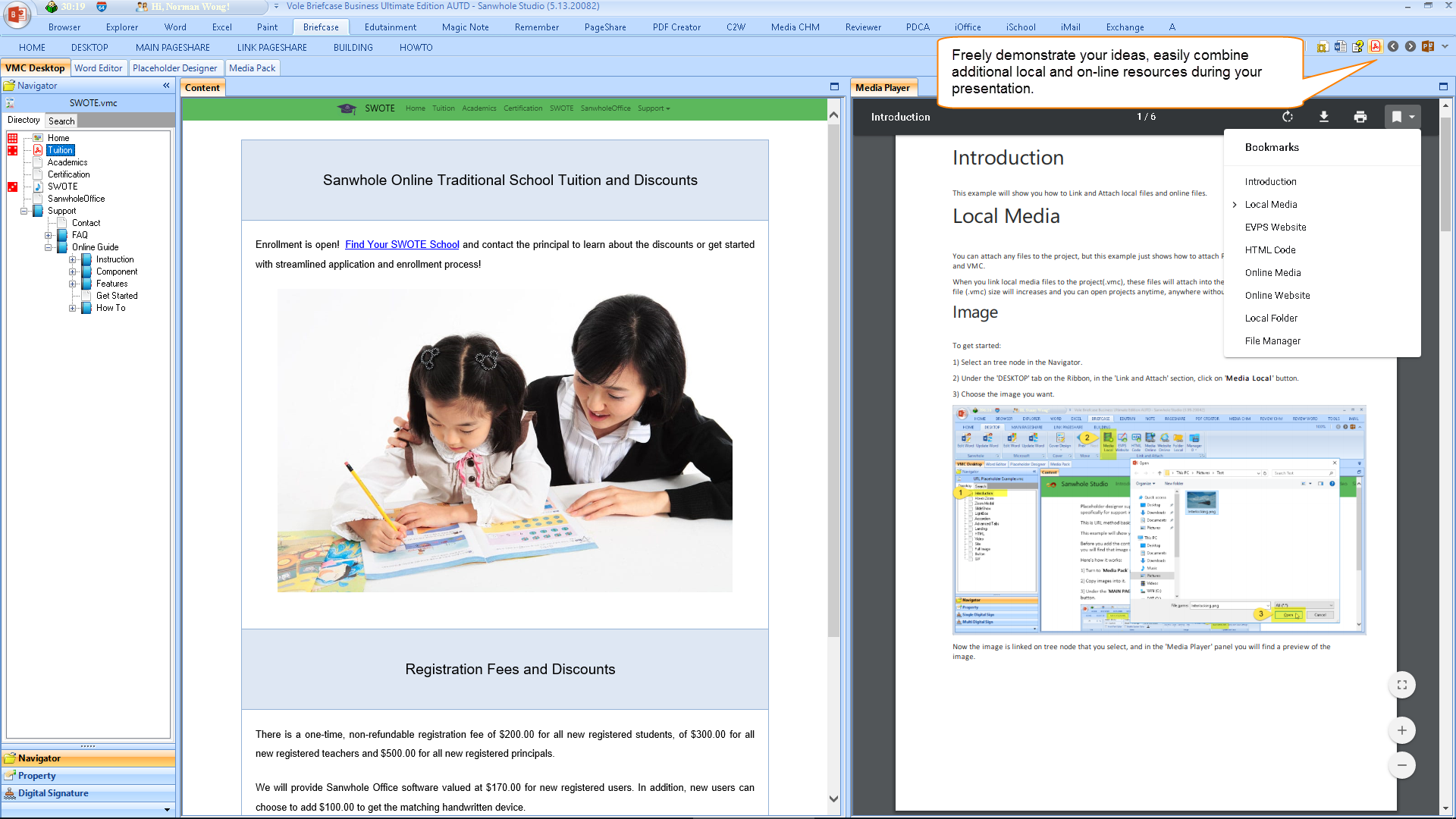
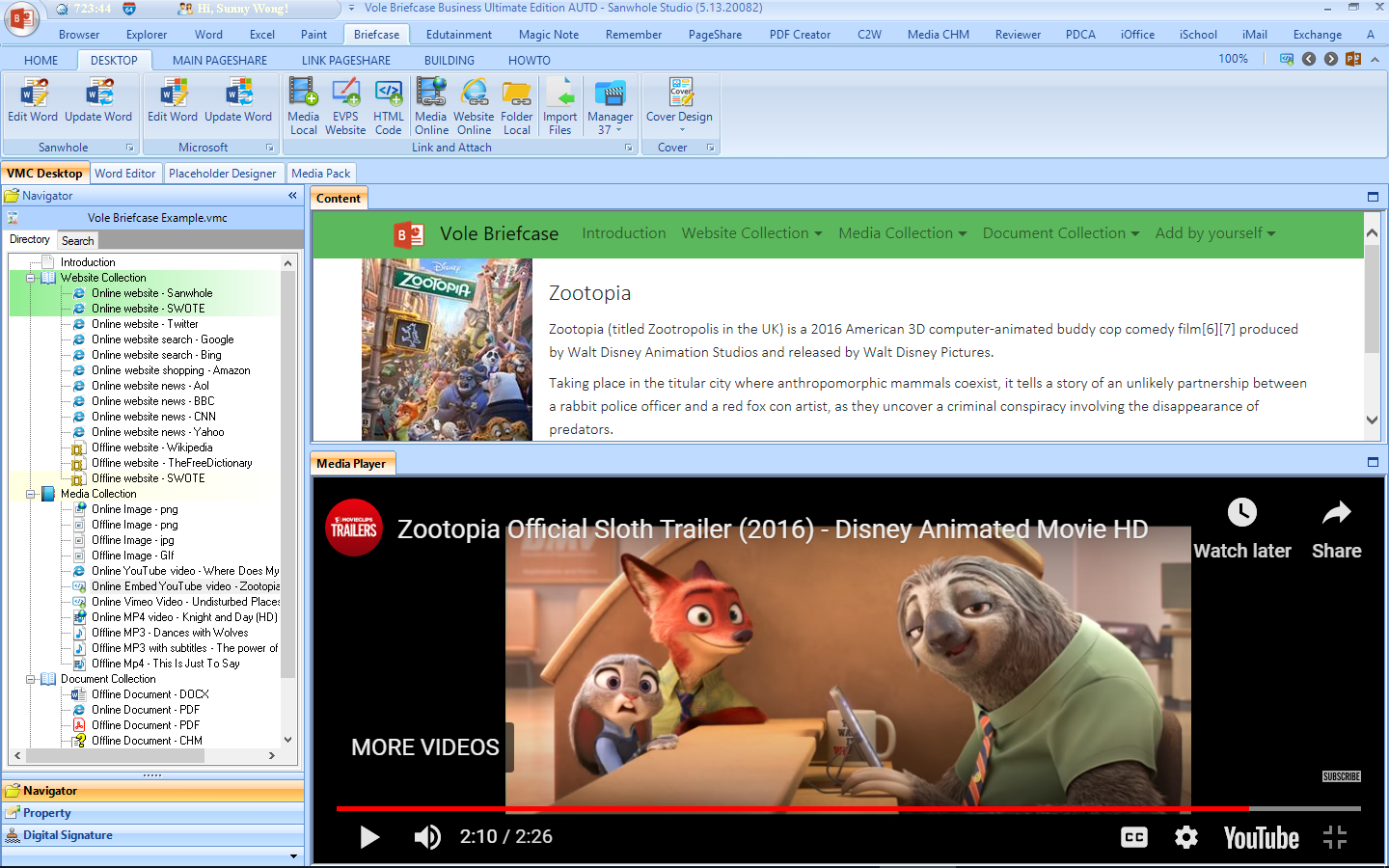
Vole Briefcase lets you to attach multimedia files and link online resources to each presentation page and synchronously display medias in media player while presenting. These media can be picture, audio, video, PDF, DOCX, RTF, TXT, MHTML, CHM, etc. and online resources such as YouTube video, website, etc. Both the master presentation document and the subordinate presentation document collection are indispensable in the presentation. Vole Briefcase gracefully brings them together.
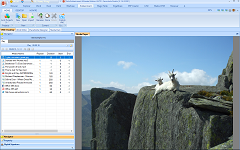
Attach and preview images
Attach and preview MP4
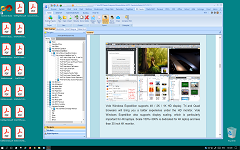
Attach and preview PDF
Fully Customized Collector of Multiple Resources
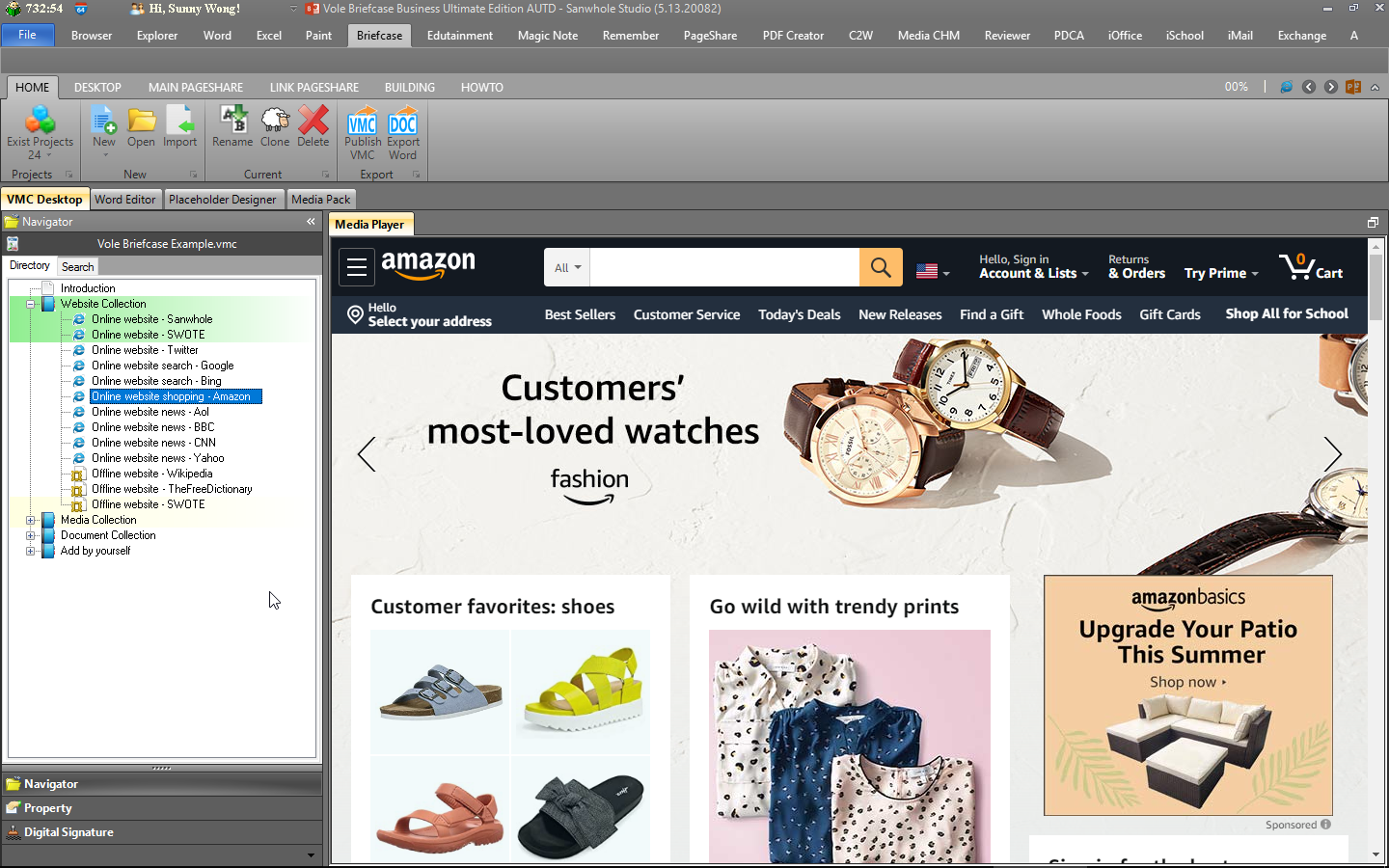
Vole Briefcase can also be used as a fully customized collector of multiple resources. Any local file, offline web page, any online web page, online media file, online video embedding code can be included in the Vole Briefcase. The built-in previewer can preview a variety of file types, including: Microsoft Word, Excel, PDF, RTF, SWF, MHTML, Multiple Text, Image, Audio, Video, YouTube, Vimeo, etc. You can add attribute descriptions and detailed Microsoft word content style descriptions for each collection resource.
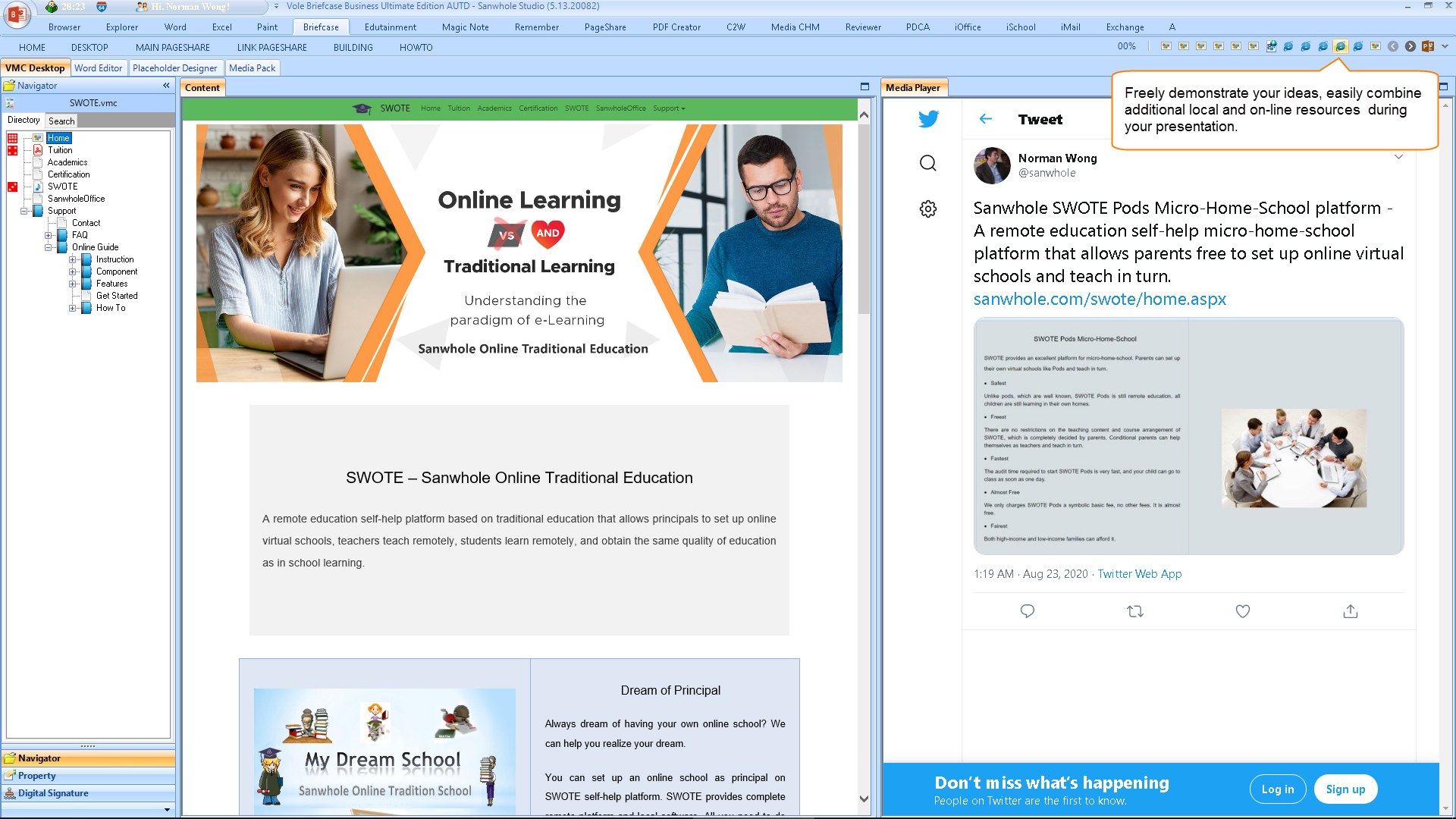
Attach and preview Twitter
Whether for presentation or self-appreciation, just the right amount of rendering will make the article pleasing to the eye. Vole Briefcase provides a fully functional Word editor that allows you to write any professional document with ease. Vole Briefcase records the source of your creative inspiration at any time by adding reference files and network link annotations. It should be emphasized here that Vole Briefcases can also incorporate various web animation controls into the work to enhance its appeal.
The Sanwhole Web Animation Control includes a series of controls with HTML5 animation effects, such as Hover Zoom, Zoom Modal, Slideshow, Accordion, Light Box, Accordion, List Scroller, Advanced Tabs, Tree, Custom HTML Code, etc. Slideshow is familiar, while Custom HTML Code supports any HTML CODE. Its typical application is to display YouTube videos, BiliBili videos, or real-time website web pages.
Sanwhole网页动画控件包含一系列具备HTML5动画效果的控件,比如: Hover Zoom, Zoom Modal, Slideshow, Accordion, Light Box, Accordion, List Scroller, Advanced Tabs, Tree, Custom Html Code etc. 幻灯片很熟悉,而自定义HTML代码(Custom Html Code)支持任何HTML CODE,典型应用是在Word中显示YouTube视频, BiliBili视频,或是显示实时网站网页。
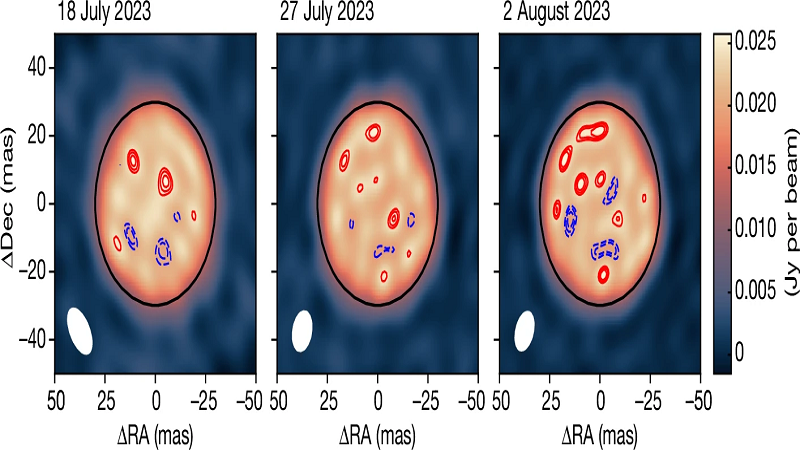
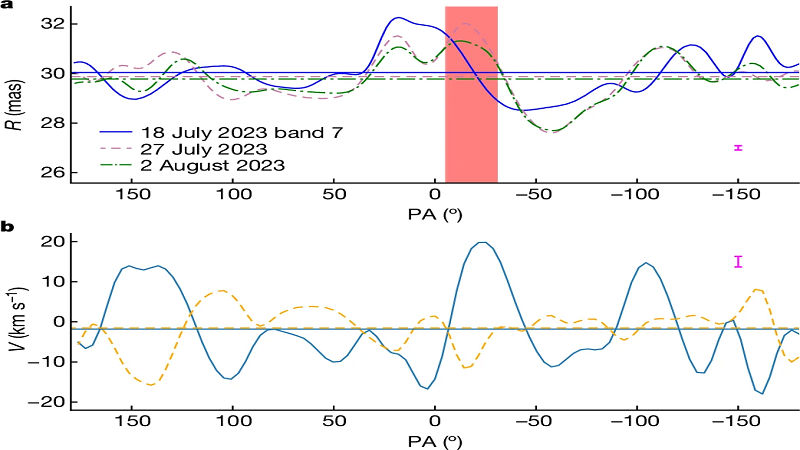
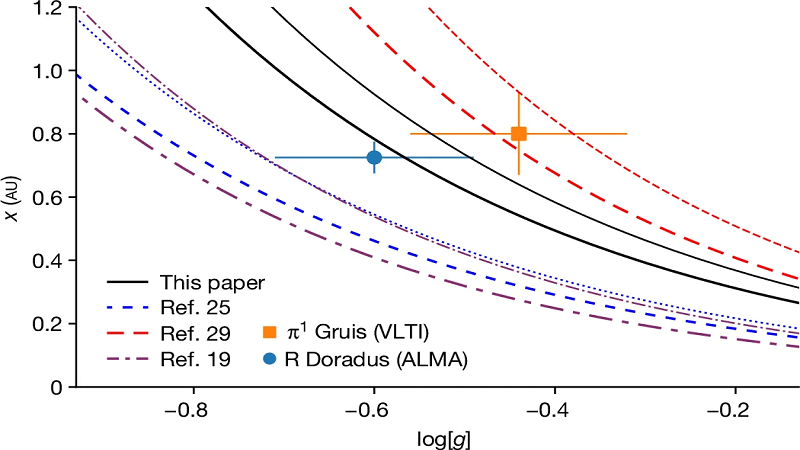
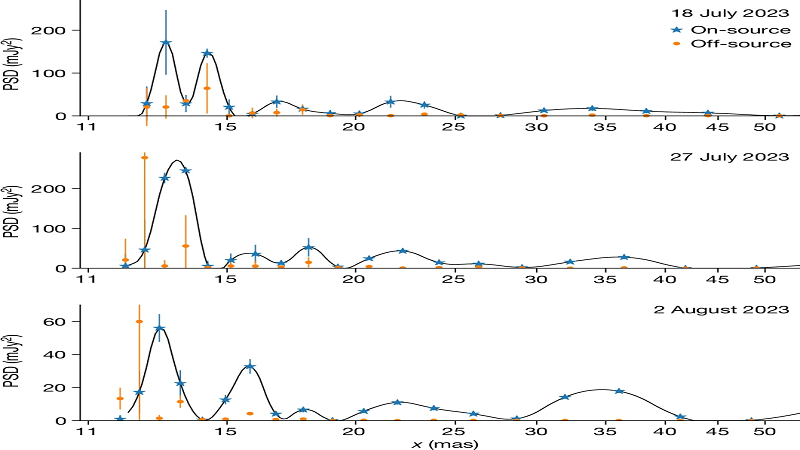
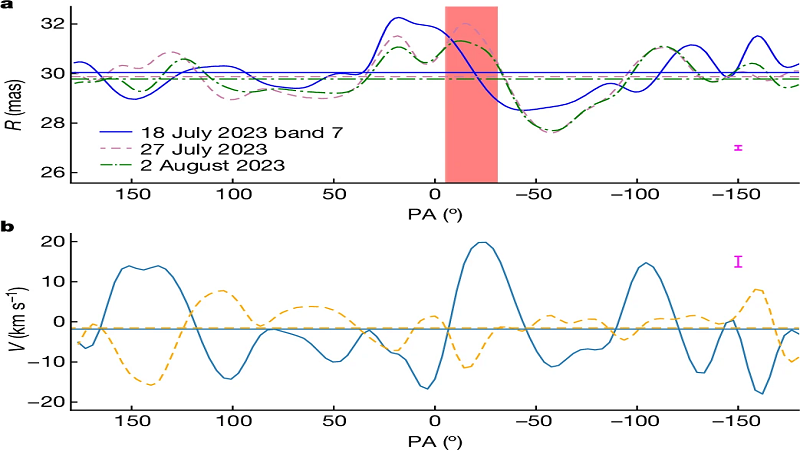
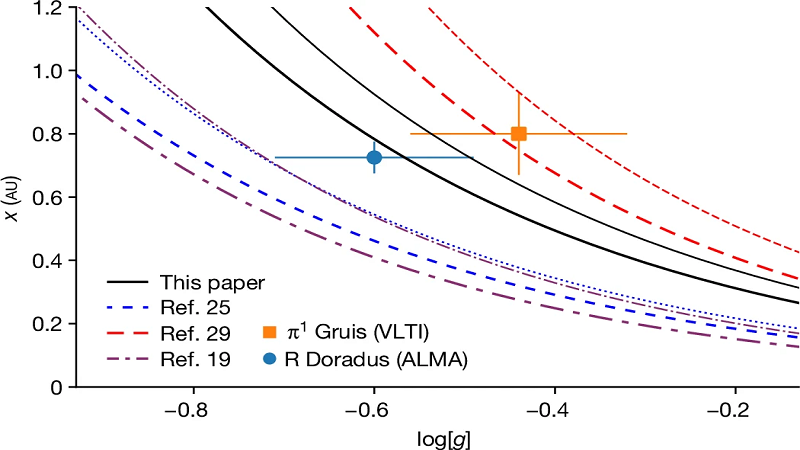
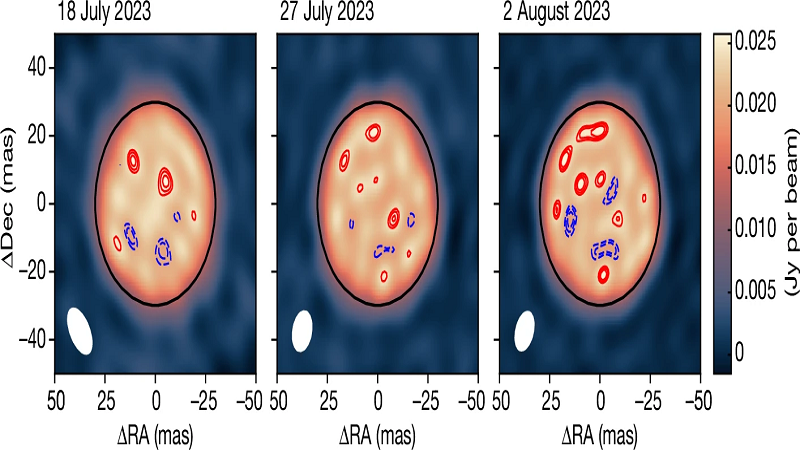
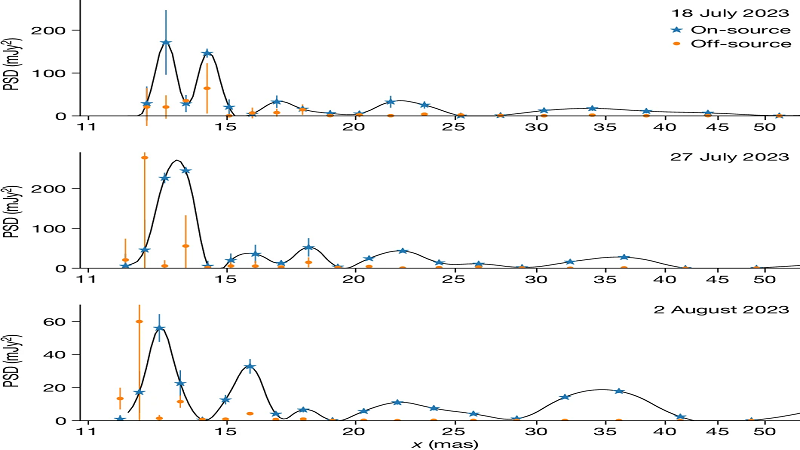
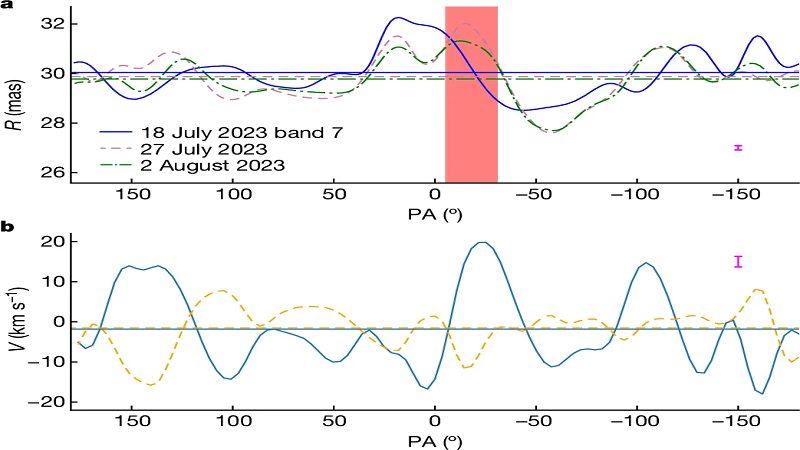
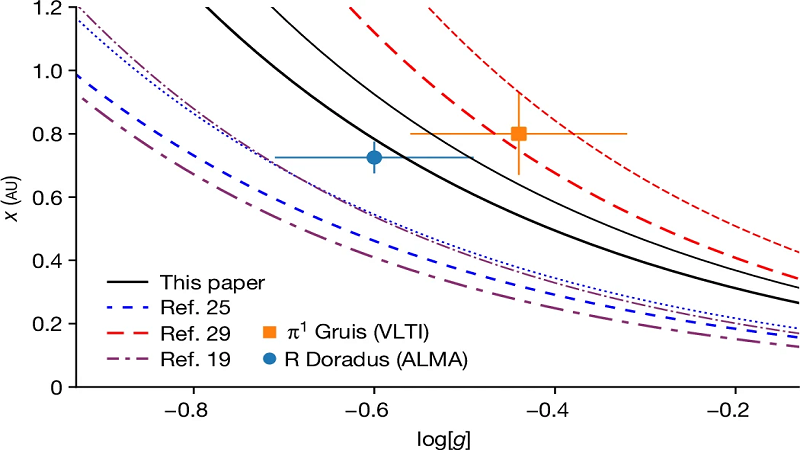
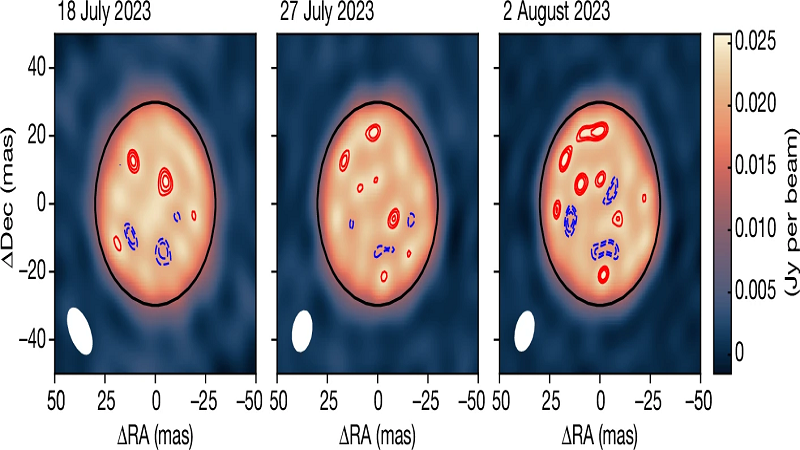
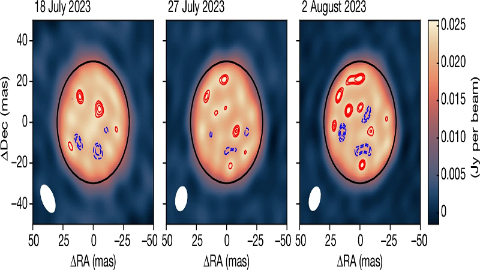
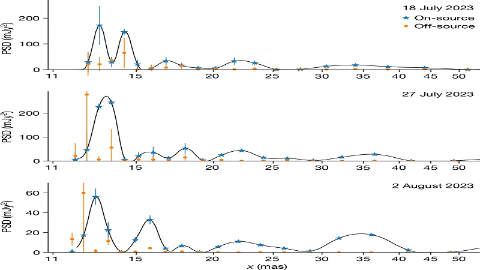
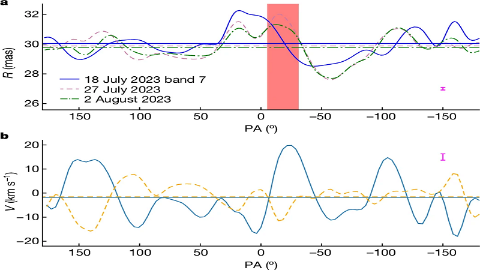
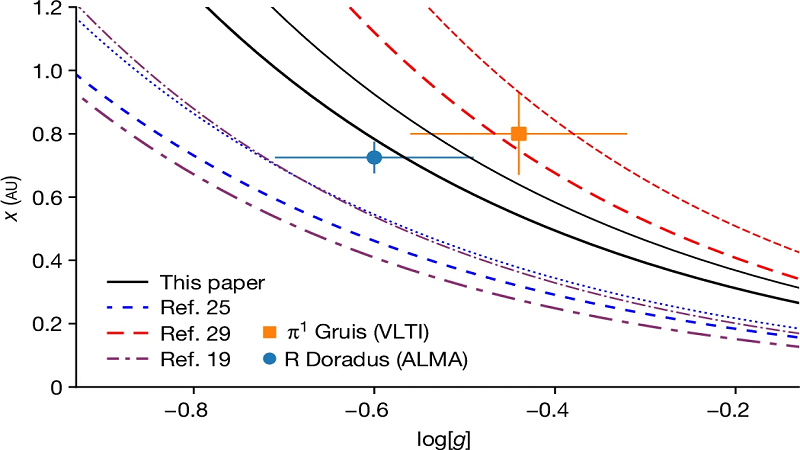
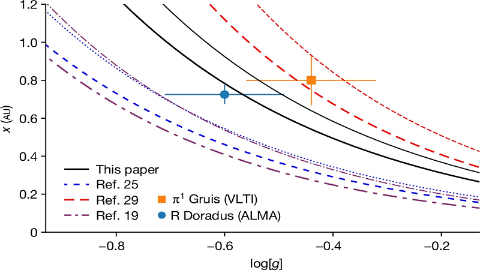
The transport of energy through convection is important during many stages of stellar evolution1,2, and is best studied in our Sun3 or giant evolved stars4. Features that are attributed to convection are found on the surface of massive red supergiant stars5,6,7,8. Also for lower-mass evolved stars, indications of convection are found9,10,11,12,13, but convective timescales and sizes remain poorly constrained. Models indicate that convective motions are crucial to produce strong winds that return the products of stellar nucleosynthesis into the interstellar medium14. Here we report a series of reconstructed interferometric images of the surface of the evolved giant star RDoradus. The images reveal a stellar disk with prominent small-scale features that provide the structure and motions of convection on the stellar surface. We find that the dominant structure size of the features on the stellar disk is 0.72±0.05 astronomical units. We measure the velocity of the surface motions to vary between −18 and +20kms−1, which means that the convective timescale is approximately one month. This indicates a possible difference between the convection properties of low-mass and high-mass evolved stars.
<
>
The transport of energy through convection is important during many stages of stellar evolution1,2, and is best studied in our Sun3 or giant evolved stars4. Features that are attributed to convection are found on the surface of massive red supergiant stars5,6,7,8. Also for lower-mass evolved stars, indications of convection are found9,10,11,12,13, but convective timescales and sizes remain poorly constrained. Models indicate that convective motions are crucial to produce strong winds that return the products of stellar nucleosynthesis into the interstellar medium14. Here we report a series of reconstructed interferometric images of the surface of the evolved giant star RDoradus. The images reveal a stellar disk with prominent small-scale features that provide the structure and motions of convection on the stellar surface. We find that the dominant structure size of the features on the stellar disk is 0.72±0.05 astronomical units. We measure the velocity of the surface motions to vary between −18 and +20kms−1, which means that the convective timescale is approximately one month. This indicates a possible difference between the convection properties of low-mass and high-mass evolved stars.
Detail = The stellar surface of the AGB star RDoradus.
Detail =The spatial PSD for three epochs of observations of RDoradus.
Detail = The radius and radial velocity of the stellar surface of RDoradus.
Detail = Size of the smallest granules on the surface of RDoradus.
The transport of energy through convection is important during many stages of stellar evolution1,2, and is best studied in our Sun3 or giant evolved stars4. Features that are attributed to convection are found on the surface of massive red supergiant stars5,6,7,8. Also for lower-mass evolved stars, indications of convection are found9,10,11,12,13, but convective timescales and sizes remain poorly constrained. Models indicate that convective motions are crucial to produce strong winds that return the products of stellar nucleosynthesis into the interstellar medium14. Here we report a series of reconstructed interferometric images of the surface of the evolved giant star RDoradus. The images reveal a stellar disk with prominent small-scale features that provide the structure and motions of convection on the stellar surface. We find that the dominant structure size of the features on the stellar disk is 0.72±0.05 astronomical units. We measure the velocity of the surface motions to vary between −18 and +20kms−1, which means that the convective timescale is approximately one month. This indicates a possible difference between the convection properties of low-mass and high-mass evolved stars.
Fig.1
Detail = The stellar surface of the AGB star RDoradus.
Fig.2
Detail =The spatial PSD for three epochs of observations of RDoradus.
Fig.3
Detail = The radius and radial velocity of the stellar surface of RDoradus.
Fig.4
Detail = Size of the smallest granules on the surface of RDoradus.
The transport of energy through convection is important during many stages of stellar evolution1,2, and is best studied in our Sun3 or giant evolved stars4. Features that are attributed to convection are found on the surface of massive red supergiant stars5,6,7,8. Also for lower-mass evolved stars, indications of convection are found9,10,11,12,13, but convective timescales and sizes remain poorly constrained. Models indicate that convective motions are crucial to produce strong winds that return the products of stellar nucleosynthesis into the interstellar medium14. Here we report a series of reconstructed interferometric images of the surface of the evolved giant star RDoradus. The images reveal a stellar disk with prominent small-scale features that provide the structure and motions of convection on the stellar surface. We find that the dominant structure size of the features on the stellar disk is 0.72±0.05 astronomical units. We measure the velocity of the surface motions to vary between −18 and +20kms−1, which means that the convective timescale is approximately one month. This indicates a possible difference between the convection properties of low-mass and high-mass evolved stars.
Fig.1
Fig.2
Fig.3
Fig.4
Detail = The stellar surface of the AGB star RDoradus.
Detail =The spatial PSD for three epochs of observations of RDoradus.
Detail = The radius and radial velocity of the stellar surface of RDoradus.
Detail = Size of the smallest granules on the surface of RDoradus.
The transport of energy through convection is important during many stages of stellar evolution1,2, and is best studied in our Sun3 or giant evolved stars4. Features that are attributed to convection are found on the surface of massive red supergiant stars5,6,7,8. Also for lower-mass evolved stars, indications of convection are found9,10,11,12,13, but convective timescales and sizes remain poorly constrained. Models indicate that convective motions are crucial to produce strong winds that return the products of stellar nucleosynthesis into the interstellar medium14. Here we report a series of reconstructed interferometric images of the surface of the evolved giant star RDoradus. The images reveal a stellar disk with prominent small-scale features that provide the structure and motions of convection on the stellar surface. We find that the dominant structure size of the features on the stellar disk is 0.72±0.05 astronomical units. We measure the velocity of the surface motions to vary between −18 and +20kms−1, which means that the convective timescale is approximately one month. This indicates a possible difference between the convection properties of low-mass and high-mass evolved stars.
The transport of energy through convection is important during many stages of stellar evolution1,2, and is best studied in our Sun3 or giant evolved stars4. Features that are attributed to convection are found on the surface of massive red supergiant stars5,6,7,8. Also for lower-mass evolved stars, indications of convection are found9,10,11,12,13, but convective timescales and sizes remain poorly constrained. Models indicate that convective motions are crucial to produce strong winds that return the products of stellar nucleosynthesis into the interstellar medium14. Here we report a series of reconstructed interferometric images of the surface of the evolved giant star RDoradus. The images reveal a stellar disk with prominent small-scale features that provide the structure and motions of convection on the stellar surface. We find that the dominant structure size of the features on the stellar disk is 0.72±0.05 astronomical units. We measure the velocity of the surface motions to vary between −18 and +20kms−1, which means that the convective timescale is approximately one month. This indicates a possible difference between the convection properties of low-mass and high-mass evolved stars.
The transport of energy through convection is important during many stages of stellar evolution1,2, and is best studied in our Sun3 or giant evolved stars4. Features that are attributed to convection are found on the surface of massive red supergiant stars5,6,7,8. Also for lower-mass evolved stars, indications of convection are found9,10,11,12,13, but convective timescales and sizes remain poorly constrained. Models indicate that convective motions are crucial to produce strong winds that return the products of stellar nucleosynthesis into the interstellar medium14. Here we report a series of reconstructed interferometric images of the surface of the evolved giant star RDoradus. The images reveal a stellar disk with prominent small-scale features that provide the structure and motions of convection on the stellar surface. We find that the dominant structure size of the features on the stellar disk is 0.72±0.05 astronomical units. We measure the velocity of the surface motions to vary between −18 and +20kms−1, which means that the convective timescale is approximately one month. This indicates a possible difference between the convection properties of low-mass and high-mass evolved stars.
The transport of energy through convection is important during many stages of stellar evolution1,2, and is best studied in our Sun3 or giant evolved stars4. Features that are attributed to convection are found on the surface of massive red supergiant stars5,6,7,8. Also for lower-mass evolved stars, indications of convection are found9,10,11,12,13, but convective timescales and sizes remain poorly constrained. Models indicate that convective motions are crucial to produce strong winds that return the products of stellar nucleosynthesis into the interstellar medium14. Here we report a series of reconstructed interferometric images of the surface of the evolved giant star RDoradus. The images reveal a stellar disk with prominent small-scale features that provide the structure and motions of convection on the stellar surface. We find that the dominant structure size of the features on the stellar disk is 0.72±0.05 astronomical units. We measure the velocity of the surface motions to vary between −18 and +20kms−1, which means that the convective timescale is approximately one month. This indicates a possible difference between the convection properties of low-mass and high-mass evolved stars.
The transport of energy through convection is important during many stages of stellar evolution1,2, and is best studied in our Sun3 or giant evolved stars4. Features that are attributed to convection are found on the surface of massive red supergiant stars5,6,7,8. Also for lower-mass evolved stars, indications of convection are found9,10,11,12,13, but convective timescales and sizes remain poorly constrained. Models indicate that convective motions are crucial to produce strong winds that return the products of stellar nucleosynthesis into the interstellar medium14. Here we report a series of reconstructed interferometric images of the surface of the evolved giant star RDoradus. The images reveal a stellar disk with prominent small-scale features that provide the structure and motions of convection on the stellar surface. We find that the dominant structure size of the features on the stellar disk is 0.72±0.05 astronomical units. We measure the velocity of the surface motions to vary between −18 and +20kms−1, which means that the convective timescale is approximately one month. This indicates a possible difference between the convection properties of low-mass and high-mass evolved stars.
Background Images and Background Animation.
When browsing content, Vole Briefcase can add preset background images and animate them. You can set the transparency of the background image, the display width of the content, the speed of the animation, and so on. Vole Briefcase can also conveniently add user images as backgrounds.
Multilayer Drawing Board
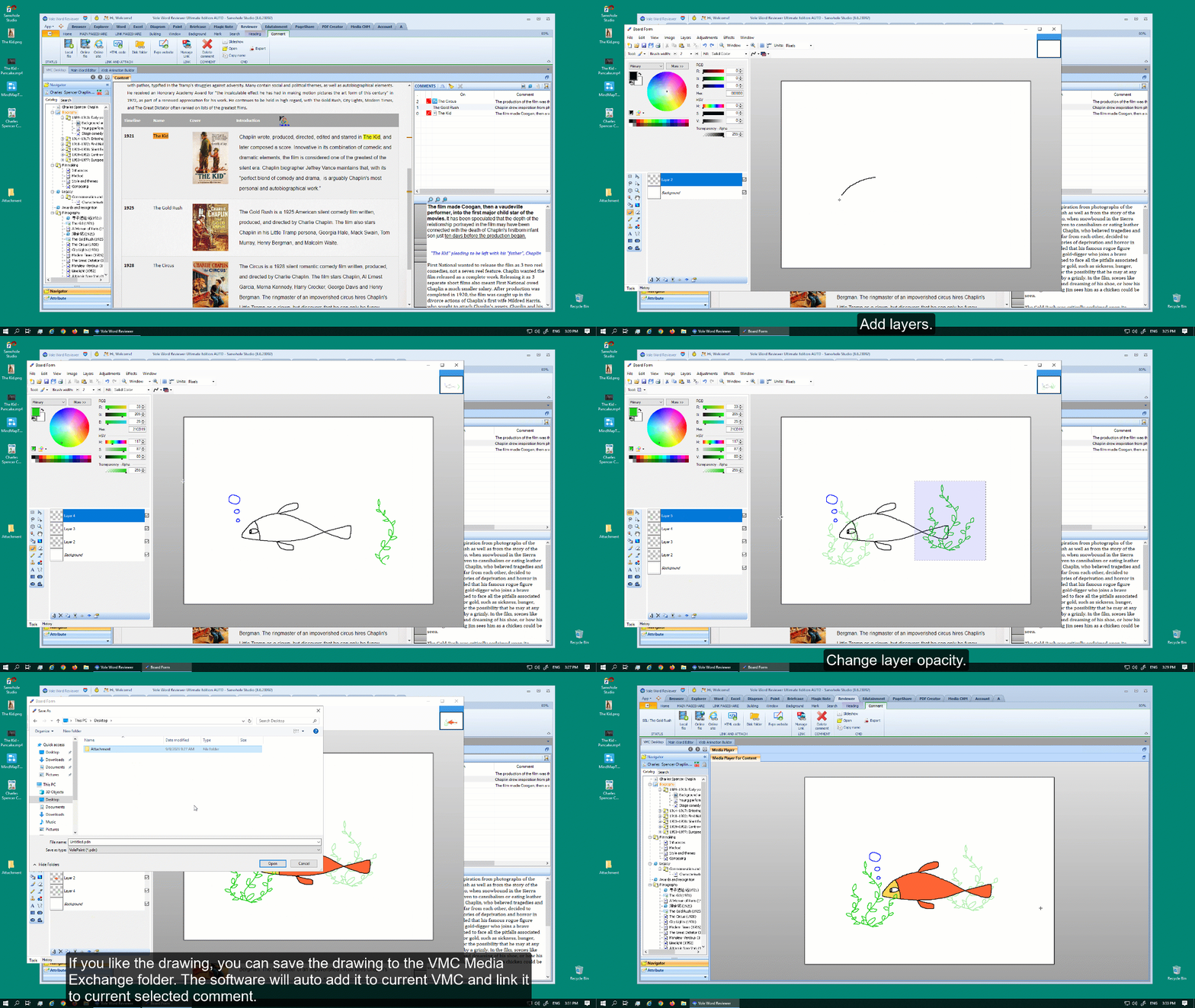
In addition to explaining the content of the presentation, it is often necessary to temporarily write some content or draw some pictures on the blackboard to help the audience better understand the presentation content. This paint board can be displayed or hidden at any time. Supports text input and painting. And it supports multiple layers, and each layer also supports transparency settings. The content of the drawing board can be saved. It can also be directly added to the VMC document currently being demonstrated. The drawing board supports Graphics Tablet. The below drawing is using WACOM Intuos 2 model XD-0912-U.
If you need to save the drawing to the current VMC. You can first set up the VMC Media Exchange folder and then save the drawing to that folder. The software will automatically add the folder files to the current VMC and link it to the current Heading or Comment. To setting the VMC Media Exchange folder: App->Configure->Set VMC Media Exchange folder.
Mind Map and Flowchart
Whether it's in personal thinking or collective decision-making. A timely mind map or flowchart can make problem analysis more accurate and conclusions more correct. It can not only unify ideas, but also facilitate step by step consistency. The system provides professional mind map and flowchart drawing, which is fast and convenient. Can be saved. It can also be directly added to the current VMC presentation.
If you need to save the drawing to the current VMC. You can first set up the VMC Media Exchange folder and then save the drawing to that folder. The software will automatically add the folder files to the current VMC and link it to the current Heading or Comment. To setting the VMC Media Exchange folder: App->Configure->Set VMC Media Exchange folder.
VMC SERIES SOFTWARE PLANS
Include: Vole Briefcase, Vole Magic Note, Vole PageShare, Vole Edutainment, Vole Reviewer, Vole PDF Creator, Vole Media CHM and Vole PDCA.
Free
Professional
Ultimate
Read-only
All features in addition to save and preview web resrouces.
 Sanwhole